This is Lesson 4 of the ERP and CRM reconciliation pipeline series, adapted from the published documentation for the erp-crm-reconciliation-pipeline repository.
What you’ll build
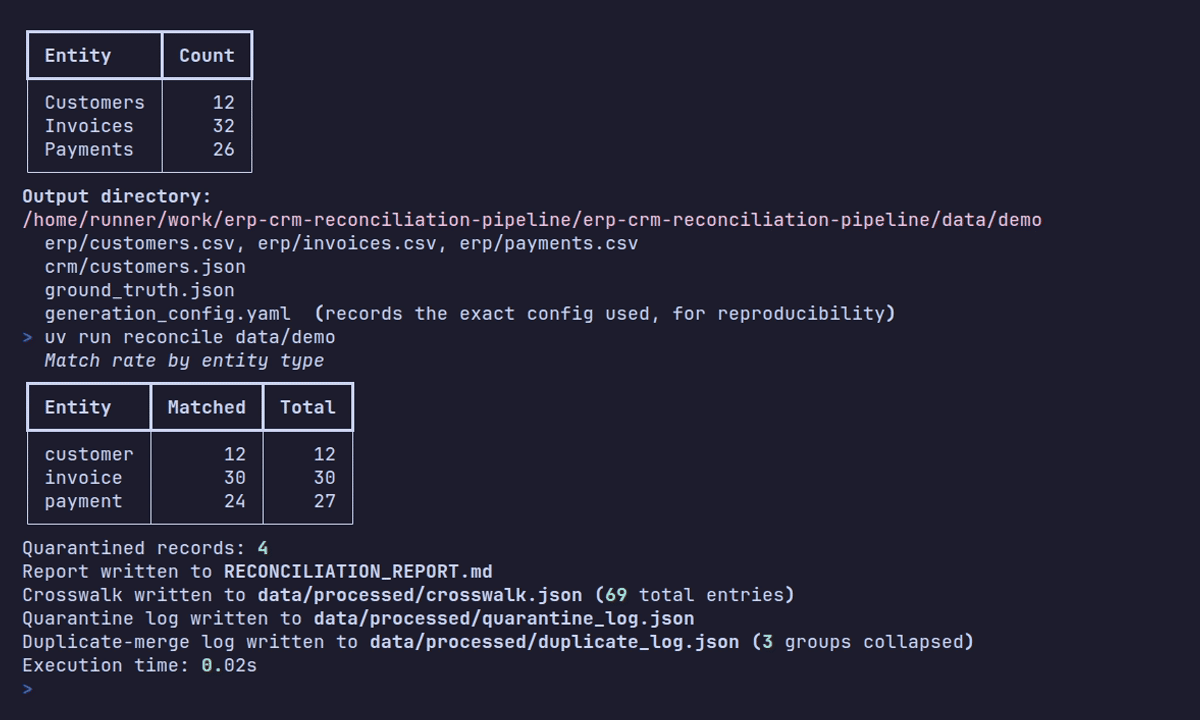
In this tutorial, you run the reconcile CLI over a dataset from earlier lessons, and walk through how it ingests, cleans, validates, and resolves ERP records against CRM records, ending with a crosswalk, a quarantine log, and a Markdown report you can hand to a stakeholder.
Before you begin
You need a generated dataset with erp/ and crm/ subdirectories, either from Lesson 1 or Lesson 3. No new dependencies are required.
See it work
Run the pipeline over your dataset:
uv run reconcile dataThis ingests data/erp/*.csv and data/crm/customers.json, cleans and validates every row, resolves ERP records against CRM records, and writes:
data/processed/crosswalk.json        # upserted on every run, never overwritten
data/processed/quarantine_log.json   # every row that failed cleaning or validation, or tied on resolution
RECONCILIATION_REPORT.md             # match rate, quarantine breakdown, orphans, payment drift
Open RECONCILIATION_REPORT.md. It’s plain Markdown, readable by a stakeholder who has never seen the pipeline’s code.
How the pipeline resolves records
reconcile runs a fixed sequence, each stage handing a smaller, more validated set of records to the next:
- Ingest. Polars reads the raw ERP CSV and CRM JSON into DataFrames.
- Clean. A chain of cleaners collapses intra-system near-duplicate rows, repairs recoverable messiness (parses every date format
datagencan produce, and repairs mojibake back to UTF-8), and applies a per-field missing-value policy. - Validate. Pydantic validates every cleaned row into a
CleanCustomer,CleanInvoice, orCleanPaymentmodel, or produces aQuarantineEntryif it can’t. - Resolve. Customers are matched by fuzzy name similarity (via
rapidfuzz) combined with normalized email and phone comparison. Invoices match within an already-resolved customer on exact issue date, currency, and amount. Payments match within an already-resolved invoice on exact payment date; amount isn’t a match gate because legitimate drift is measured separately. No resolver uses business-key format. - Persist and report. A crosswalk entry, quarantine entry, or both is written for every record, and a Markdown report summarizes the run.
Every record lands in one of four outcomes, not two: it matches, it’s a genuine one-sided orphan (valid, not quarantined), it’s ambiguous (tied candidates; the pipeline never guesses), or it’s invalid (failed cleaning or validation). Collapsing orphan into quarantine would make a normal, two-system dataset look like a broken pipeline in the final report, so the pipeline keeps them distinct.
Quarantine entries carry a reason_code: unparseable_date, unrecoverable_encoding, missing_required_field, schema_invalid, or ambiguous_match. Every row that fails cleaning, validation, or ties on resolution ends up here with a reason, never silently dropped.
The crosswalk’s canonical_id is a fresh UUID v4 minted at resolution time, not a reuse of any internal generator ID a real pipeline would never see. Each crosswalk row still carries the source business keys, erp_key and crm_key, nullable, alongside that surrogate ID, so downstream joins and audits still have something stable to match on within a single system.
Work through one customer match
Follow Dennis Boone from Lesson 2 through the actual customer confidence function. After cleaning, both records contain the same name, email, phone, address, and created date. The resolver scores the three matching signals as follows:
| Signal | Comparison | Weight | Contribution |
|---|---|---|---|
| Name | RapidFuzz WRatio = 100% | 0.80 | 0.80 |
| Normalized email | Exact match | 0.15 | 0.15 |
| Normalized phone | Exact match | 0.05 | 0.05 |
| Total confidence | 1.00 |
The total clears the default 0.75 threshold. Mutual top-match agreement then verifies that each record is the other’s unique best candidate. The resulting crosswalk entry is:
{
  "entity_type": "customer",
  "canonical_id": "73bff3e0-ba15-46ce-bd64-b025bec2f277",
  "erp_key": "C000001",
  "crm_key": "CUST-000001"
}
The UUID changes when you create a fresh crosswalk, but the source-key pair is stable. Notice what is absent from the calculation: the resolver never converts either business key to the number 1.
Compare your run with measured output
Running the committed eight-customer fixture at source commit 54c0e15 produces:
Total records ingested: 87
Success rate: 90.8%
Records quarantined: 8

customer  matched=8   total=8    match rate=100.0%
invoice   matched=16  total=16   match rate=100.0%
payment   matched=12  total=19   match rate=63.2%
Five rows are quarantined for unparseable_date, and three are quarantined for missing_required_field. The run also preserves four ERP-only and three CRM-only payments as valid orphans.
The seed-42 200-customer command from Lesson 1 produces a more realistic run:
| Measure | Result |
|---|---|
| Physical records ingested | 2,478 |
| ERP customers, invoices, payments | 204, 608, 422 |
| CRM customers, invoices, payments | 204, 612, 428 |
| Records quarantined | 162 |
| Success rate | 93.5% |
| Customer matches | 197 of 197, 100.0% |
| Invoice matches | 465 of 607, 76.6% |
| Payment matches | 295 of 507, 58.2% |
| Duplicate groups collapsed | 48 |
| Payment amount mismatches | 10, with total drift 19.26 |
The 162 quarantines break down into 72 unparseable dates and 90 missing required fields. There are no ambiguous matches, schema-invalid rows, or unrecoverable encodings in this seeded run.
Run the reconciliation pipeline
-
Confirm you have a dataset with
erp/andcrm/subdirectories underdata/. -
Run:
uv run reconcile data -
Confirm the three output paths exist:
data/processed/crosswalk.json,data/processed/quarantine_log.json, andRECONCILIATION_REPORT.md.
Read the reconciliation report
Open RECONCILIATION_REPORT.md and look for:
- The overall match rate across customers, invoices, and payments.
- A breakdown of quarantined rows by
reason_code. - Counts of genuine orphans, records that exist in only one system by design.
- A summary of payment amount drift between the ERP and CRM copies of the same payment.
Inspect the crosswalk and quarantine log
Open data/processed/crosswalk.json and find one entry. Confirm it carries a canonical_id, plus the erp_key and crm_key (one of which may be null for an orphan). Then open data/processed/quarantine_log.json and find one entry with a reason_code you recognize from the messiness ratios in Lesson 3, for example unparseable_date after a high --bad-date-ratio.
Confirm idempotent re-runs
Run uv run reconcile data again on the same, unchanged input. The crosswalk is upserted, not overwritten: existing entries are kept, and only genuinely new ones are appended, so re-running the pipeline never duplicates a canonical entity.
Verify your work
- Confirm
crosswalk.json,quarantine_log.json, andRECONCILIATION_REPORT.mdall exist after areconcilerun. - Read the match rate and quarantine breakdown in
RECONCILIATION_REPORT.md. - Rerun
reconcileon the same input and confirm the crosswalk entry count doesn’t grow.
Troubleshooting
| Symptom | Resolution |
|---|---|
reconcile can’t find erp/ or crm/ subdirectories | Point data_dir at the --output-dir you passed to datagen generate, not a subdirectory of it. |
| Almost every record ends up quarantined | Confirm the input was produced by datagen generate; reconcile expects that export shape. |
| Expecting a precision or recall number in the report | reconcile never reads ground_truth.json; scoring is a separate step, covered in Lesson 5. |
Next steps
The next lesson scores this run’s matches against the ground_truth.json answer key from Lesson 1, and optionally loads the same run into Postgres. Continue with Score match quality and load results into Postgres.
For the full flag reference, read the CLI reference in the published documentation.