I built a governed dependency pipeline so that no third-party package reaches an application until it has been scanned, judged by a tested policy, and approved, with evidence kept for every decision. In end-to-end runs on fresh containers, it promoted lodash 4.18.1 and blocked lodash 4.17.4 for a critical vulnerability. A developer pointed at the approved registry could install only the first. When data is missing, it says no.
At a glance
- Problem: developers and AI agents install packages straight from public registries. Nobody decides or records which ones to trust.
- What I built: a quarantine-to-approved npm pipeline with a policy-as-code gate, plus SBOM monitoring after release.
- Result: two versions of the same package, one promoted and one blocked, both with recorded reasons. 8 of 8 policy tests pass in CI.
- Stack: Nexus 3.84.1, Trivy 0.76.0, OPA 1.21.2, OpenSSF Scorecard, Syft 1.54.1, Dependency-Track 4.13.5, and Docker Compose.
- Source: governed-dependency-pipeline on GitHub.
The problem
In most teams, any developer can run npm install or pip install and pull code written by a stranger into a production build. Nobody checks it first, nobody records the decision, and usually nobody watches it afterward.
event-stream, ua-parser-js, Log4Shell, and the xz-utils backdoor all reached real systems for the same reason: trust in a dependency was assumed, never decided. The usual answers fall short. A vulnerability scanner in CI reports problems after the package is already in the build. An allow-list in a wiki goes stale the week it’s written. Neither leaves a record of who approved what and why.
Why AI makes this urgent
AI coding assistants and agents now choose many of the packages that end up in our builds, and they choose wrongly in a predictable way. That turns an old trust problem into a faster, larger one.
AI invents packages that don’t exist. A USENIX Security 2025 study tested 16 code-generating models across 576,000 Python and JavaScript samples. 19.7% of the recommended packages didn’t exist: 205,474 unique made-up names. Open-source models averaged 21.7%, and commercial models averaged 5.2%.
The made-up names repeat. In the same study, when a prompt was re-run 10 times, 43% of hallucinated packages appeared every time. A repeatable mistake is a predictable one, and a predictable one can be exploited. Seth Larson of the Python Software Foundation calls this slopsquatting: registering the names AI keeps inventing and waiting for someone to install them.
It has already worked. In late 2023, researcher Bar Lanyado registered huggingface-cli, a name models kept recommending, as an empty package on PyPI. It received more than 15,000 genuine downloads in three months, and an Alibaba research repository’s README told users to install it. His package was harmless. The next one might not be.
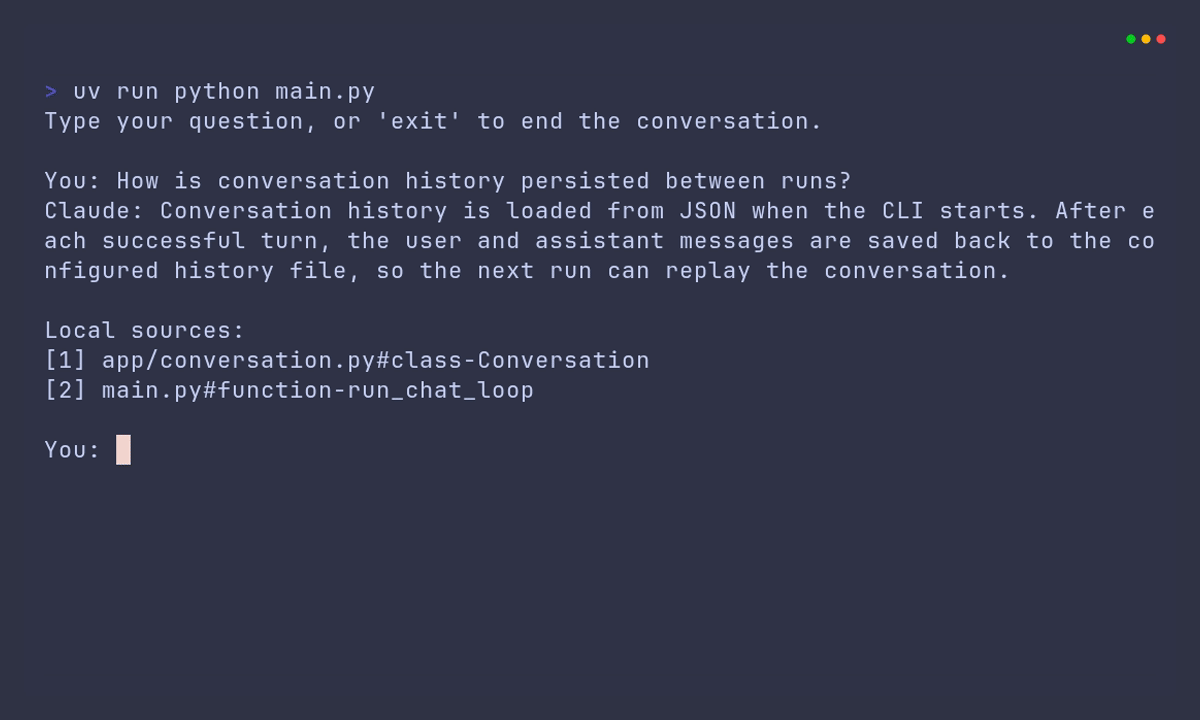
Agents remove the human pause. When a person copies an install command, there’s at least a moment to notice an odd name. An agent with a shell runs npm install and moves on. More code is written faster, with more dependencies, and fewer people read each one. This applies to AI tools you build yourself too, such as the Claude chat CLI with hybrid RAG retrieval.
A governed pipeline answers each of these risks:
- A hallucinated name that nobody has registered isn’t in
npm-approved, so the install fails safely. - A freshly registered slopsquat package usually has no OpenSSF Scorecard yet, because the public API only covers projects it already scans. The policy treats missing data as a denial, so the package is blocked by default.
- Agents can use exactly the same registry as developers. An agent that can only reach
npm-approvedcan only install what the gate approved. - Every approval leaves evidence, so when AI-written code ships, there’s still a record of who asked for each dependency and why it was trusted.
Requirements and constraints
I designed against four capabilities. Each answers a question a security lead eventually asks: where packages come from, what’s inside them, what the rules are, and whether last month’s approval is still safe today.
- Must: give developers and agents one registry that holds only approved packages.
- Must: scan the whole dependency tree, not just the package that was requested.
- Must: decide with a written, tested policy and record the evidence for every request.
- Must: keep watching approved packages after they ship.
- Must not: run a package’s install scripts while inspecting it. That’s exactly how malicious packages execute.
- Must not: pass a package because data was missing.
- Non-goal: more than one ecosystem. npm alone was enough to prove the pattern.
- Non-goal: an exceptions or waiver workflow. It matters in production, but it’s a process problem before it’s a code problem.
- Non-goal: production hardening. Everything runs locally on Docker Compose with demo credentials.
Architecture
A package moves left to right through five zones, under a policy lane, with a monitoring loop running back underneath.
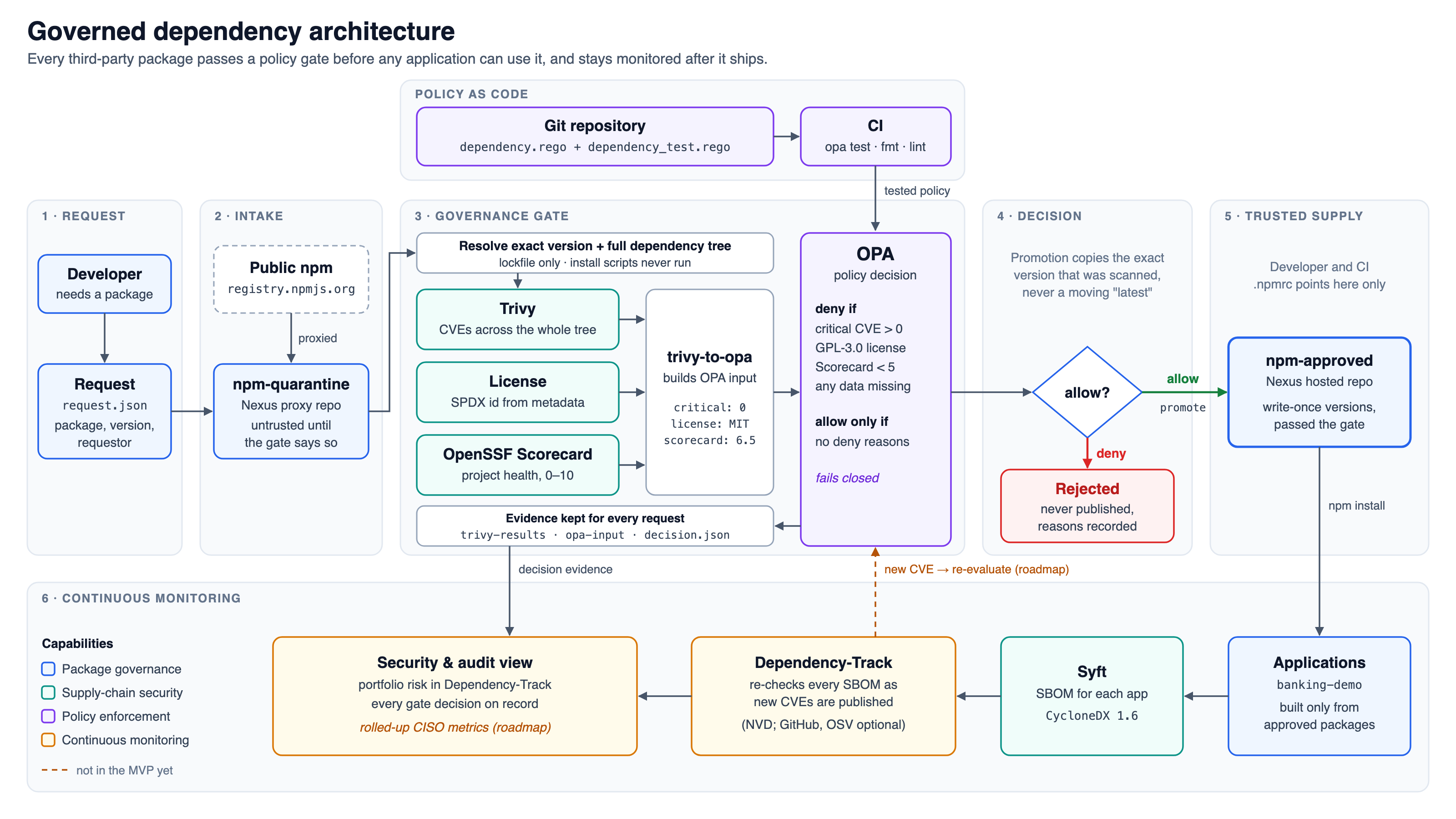
- Request: a developer asks for a package by name and version. The request names who asked, so every decision has an owner.
- Intake: Nexus proxies the public npm registry into
npm-quarantine. Anything there is untrusted until the gate says otherwise. - Governance gate: Trivy, the license, and the OpenSSF Scorecard produce facts about the exact version and its whole tree, and OPA decides.
- Decision: allowed packages are promoted, and promotion copies the exact version that was scanned, never a moving
latest. Denied packages are never published, and their reasons are recorded. - Trusted supply:
npm-approvedis the only registry developers and CI install from. Versions there are write-once. - Continuous monitoring: applications built from approved packages get an SBOM, and Dependency-Track re-checks it as new CVEs are published.
Above the gate, the policy lives in Git and is tested in CI before it’s used. The dashed line from monitoring back to the gate is the one piece that isn’t built yet. I come back to it in What I’d do next.
Key decisions and trade-offs
Where should the policy live?
- Options: Sonatype’s commercial Repository Firewall, a severity threshold on the scanner’s exit code, or a separate policy engine.
- Chose: a separate engine, Open Policy Agent.
- Why: one decision combines vulnerabilities, license, and project health, returns reasons a developer can act on, and is unit-tested like any other code.
- Cost: one more component, plus a small script that converts Trivy’s report into policy input, which I now maintain.
How should a package be inspected?
- Options: install it in a sandbox and scan the result, scan only the downloaded tarball, or resolve the dependency tree into a lockfile without installing anything.
- Chose: lockfile only, with install scripts disabled.
- Why: it covers every transitive dependency, takes seconds, and never executes untrusted code.
- Cost: no behavior analysis. A malicious install script with no published CVE would pass the vulnerability check. Disabling install scripts for consumers limits the damage, and malware detection is on the list for later.
What happens when data is missing?
- Options: treat missing data as a pass, or as a failure.
- Chose: failure. A required-fields rule denies any request that lacks a vulnerability count, a license, or a Scorecard:
deny contains msg if {
	some field in required_fields
	not field in object.keys(input)
	msg := sprintf("Missing required field: %s", [field])
}- Why: in Rego, a comparison against a missing field is undefined, so
input.scorecard < 5quietly passes a package that has no Scorecard at all. Freshly registered packages, including slopsquats, are exactly the ones with no data. - Cost: legitimate packages without a public GitHub repository are denied until there’s an exceptions process.
How should an approved package be promoted?
- Options: the move and staging features in Nexus Pro, routing rules that expose parts of the quarantine proxy, or copying the exact version into a separate hosted registry.
- Chose: copy it. The script packs the exact version that was scanned and publishes it to a write-once
npm-approvedregistry. - Why: it works on the free Community Edition, and developers see one simple registry. It never promotes a moving
latest. - Cost: only the requested package is copied. A package with its own dependencies won’t install from
npm-approveduntil those are promoted too. lodash has no dependencies, which is why the demo works, and why this is the first gap to close.
How I know it works
| Check | Result |
|---|---|
| Policy unit tests | 8 of 8 passing |
| CI on every push | Green on first push |
| End-to-end run | All steps passed |
| Consumer install | Only 4.18.1 installs |
| Repository secret scan | 0 findings |
The unit tests cover each deny rule, the Scorecard boundary at exactly 5, missing fields, empty input, and several violations at once. CI runs opa test, opa fmt, and ShellCheck on all four scripts. The end-to-end run followed the README on fresh Nexus, Dependency-Track, and Postgres containers, through the gate, promotion, and SBOM upload. Installing from npm-approved alone, 4.18.1 installs and 4.17.4 fails with ETARGET. The secret scan is trivy fs --scanners secret . against the repository.
The representative run is one package, two versions. Each request resolves the exact version, scans its tree, and writes the trivy-results.json, opa-input.json, and decision.json files. The following output is trimmed:
$ scripts/gate.sh repos/lodash-request/request.json      # lodash@latest
==> lodash@4.18.1 (requested: latest, by: developer)
==> Scorecard for github.com/lodash/lodash: 6.5
  "input": { "critical": 0, "license": "MIT", "scorecard": 6.5 },
  "allow": true,
  "deny": []

$ scripts/gate.sh old-lodash.json                         # lodash@4.17.4
==> lodash@4.17.4 (requested: 4.17.4, by: test)
  "input": { "critical": 1, "license": "MIT", "scorecard": 6.5 },
  "allow": false,
  "deny": ["Critical vulnerabilities found"]
The pipeline behaves the same way when things fail. A request with missing data is denied with a named reason, and a promotion that can’t download its package now stops with npm’s own error instead of exiting silently.
Results
- A decision in seconds: the gate decided lodash in 4.3-5.2 seconds over three runs, and decided express 5.3.0, with 65 packages in its tree, in about 9 seconds. I measured these on my laptop against the public npm registry.
- The vulnerable version never reached developers: lodash 4.17.4 was denied for one critical finding. An install of it from
npm-approvedfailed, while 4.18.1 installed normally. - Every decision is explainable: each request leaves three evidence files, including the exact input the policy saw and the reasons it gave.
- Monitoring is live after release: Dependency-Track tracked all 39 components of the sample app’s SBOM after upload and re-checks them as new vulnerabilities are published.
- Four defects caught before publishing: running the README from a clean start, on throwaway containers, found the four problems described in the next section.
What went wrong and what I learned
My first build of this looked finished. Every step in my notes had a green tick. Running it properly, from a clean clone, exposed four problems, and each one is a lesson that applies well beyond this demo.
The policy could never say yes. It declared default allow := false and never defined when allow becomes true. Every package was blocked, including the clean ones. I hadn’t noticed because I was only looking at the deny messages, which were correct. Lesson: test the allow path, not just the deny path.
The database was never used. Dependency-Track was configured with the wrong environment variables for its version. It silently fell back to an embedded H2 database inside the container, with no volume. Postgres was running, healthy, and completely empty. I found out the hard way when a test run pushed Docker past its memory limit, the container was killed, and the embedded database was corrupted beyond repair. Lesson: check that the data lands where you think it does.
Every download failed with 403. Nexus Community Edition refuses to serve any package until its EULA has been accepted. My script was also hiding the error, so promotion failed without a message. Lesson: a security pipeline that fails silently is worse than no pipeline, because it looks like it works.
The scans and the policy weren’t connected. My original walkthrough ran Trivy, then evaluated OPA against JSON files I had typed by hand. The “rejected log4j” demo was a file containing "critical": 5. The glue script that turns a real Trivy report into policy input is what makes this a pipeline rather than two separate demos.
What I’d do next
- Promote the whole tree: gate and copy every dependency of an approved package, so packages with dependencies install from
npm-approvedtoo. - Close the monitoring loop: when Dependency-Track reports a new critical vulnerability in an approved package, re-run the gate and flag or withdraw that version automatically. That’s the dashed line in the diagram.
- Python and PHP: the pattern carries over unchanged. Nexus can proxy PyPI, and Trivy reads the
poetry.lock,Pipfile.lock, andcomposer.lockfiles. The policy needs no change at all, because it only sees the vulnerability count, license, and Scorecard. The real work is resolving a Python tree without building source distributions, since building one runs its code. - Normalize licenses: today only the exact string
GPL-3.0is blocked.GPL-3.0-only,AGPL-3.0, and expressions such asMIT OR GPL-3.0get through. - Check provenance: verify npm provenance attestations and Sigstore signatures where publishers provide them.
Production use would also need an exceptions process with an owner and an expiry date, authentication and TLS on every registry, and the gate run as a service from a pull request instead of a laptop script.
Start small
You don’t need the whole stack to get most of the protection. Each of these steps takes minutes:
- Check before you install what an AI suggested: look the package up with
npm view <name>or on pypi.org. A name that doesn’t exist, or one that exists but is days old with no repository, is a red flag. - Stop install scripts from running: use
npm config set ignore-scripts truefor npm, andpip install --only-binary=:all:for pip, which refuses packages that would run setup code. - Commit your lockfile and install from it: use
npm ci, orpip install -rwith pinned versions, so a build installs what was reviewed. - Fail the build on critical findings:
trivy fs --severity CRITICAL --exit-code 1 .in CI is one line. - Give AI agents a registry you control: even a plain Nexus proxy gives you a log of what was pulled and a single place to block a package.
Try it yourself
- Source code: governed-dependency-pipeline on GitHub
- Step-by-step guide: the README takes you from the policy tests, which need no containers, to the full stack with Nexus, real promotion, and Dependency-Track. Every step shows its expected output, and a troubleshooting table covers each problem described earlier.
If something breaks for you, open an issue on the repository.
I’m looking for AI-focused software engineering roles where this kind of work matters. Get in touch.